
Parent Login
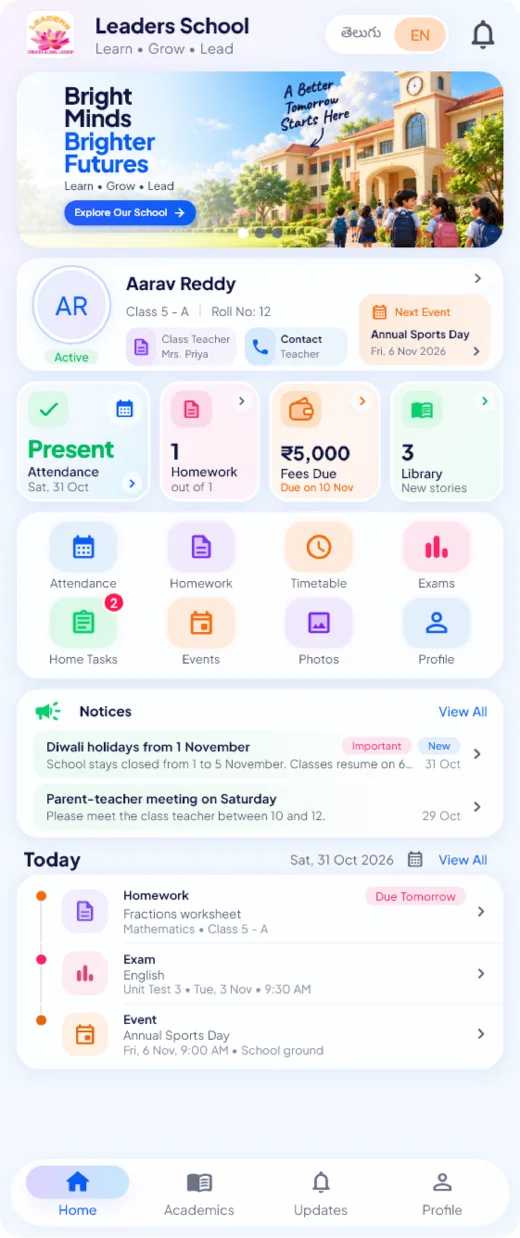
Your child's school day, on your phone
The official Parents App of our school. See every update about your child in one place, in Telugu or English.
How parents sign in
Enter your mobile number and your child's date of birth. No password is needed.
- Attendance
- Homework
- Home Tasks
- Library
- Fees, online payment and receipts
- Notices
- Exams and results
- Photos
- Notifications
- Telugu and English
Takes about two minutes
How to install
The app is installed directly from this website, so Android asks for one extra permission the first time.
-
Download
Tap Download the Parents App on this page. The app file (APK) is saved to your phone.
-
Allow the install
Open the downloaded file. If Android asks, turn on Allow from this source for your browser or Files app.
-
Install and open
Tap Install, then Open. You can turn the permission off again afterwards.
-
Login
Enter the mobile number you gave the school and your child's date of birth. No password is needed.
Install the app only from this website or a link shared by the school office. Do not share your login details with anyone.
Questions
Frequently asked questions
Do I need to register?
No. The school office has already added your child's date of birth and your mobile number. Just login with these two. If your mobile number is not in the school records, please contact the school office.
I am unable to login. What do I do?
Check the mobile number and your child's date of birth. After 5 wrong tries, wait 15 minutes and try again. You can also tap Unable to login? Ask the school on the login screen, and the school office will contact you. You can also call the office on 9949438601.
Can I see all my children in one account?
Yes. Every child linked to your mobile number by the school appears in your account, and you can switch between them on the Home screen.
Will I get notifications?
Yes. The app tells you when homework is given, when your child is absent, when results are declared and when the school sends a notice.
Can I pay fees in the app?
Yes. See what is due, pay the school's UPI QR code from the app and upload the payment screenshot. Once the school office approves it, your receipt shows in the app. You can also pay at the school office as usual.
Is my child's information safe?
Only you and authorised school staff can see your child's records. Connections are encrypted, there are no ads, and information is never sold. Read our Privacy policy
Is there an iPhone app?
The app is currently available for Android phones. Please contact the school office if you use an iPhone.